Environment variables
Where to set env vars
Section titled “Where to set env vars”| Kind | Where | Does the app see it at runtime? |
|---|---|---|
Runtime: API keys, TZ, URLs… (non-secret values too) |
The environment’s Cài đặt → Secrets (settings, secrets) | Yes, same name |
Build-time: VITE_*, NEXT_PUBLIC_*… |
[build] env in embra.toml |
No |
DATABASE_URL, PORT, S3_* |
Set by Embra | Yes |
embra.tomlhas no[deploy] env. Unknown fields inembra.tomlfail the build (REPO_CONFIG_INVALID).- Adding, changing and revoking a single secret: see Secrets.
Pasting a whole .env file
Section titled “Pasting a whole .env file”- Open the environment’s Cài đặt → Secrets → “Dán .env” (paste .env).
- Paste into Nội dung .env (.env contents), or pick a file under “Hoặc chọn file .env” (or choose a .env file).
- Check the table: each line is Mới (new), Đổi giá trị (replace value), Giữ nguyên (keep current) or Bỏ qua (skipped). Untick lines you don’t want.
- Click “Lưu … secret” (save … secrets).
- Click “Build lại” (rebuild), if shown, so the app picks up the new values.
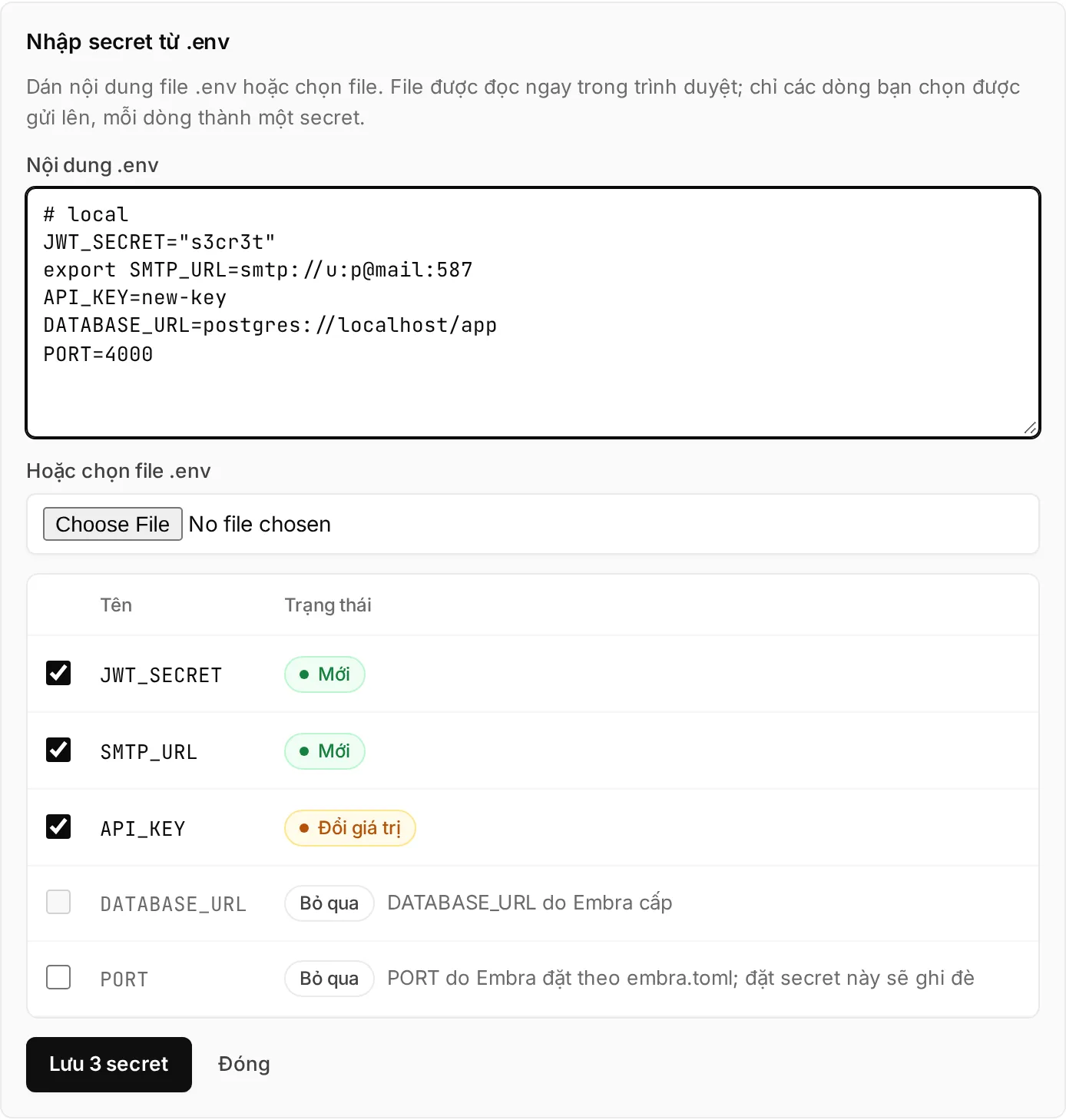
The file is read in your browser; only the lines you keep are sent to the server.
How the console reads a .env file
- Understands
#comments, anexportprefix, single- or double-quoted values, multi-line values inside quotes. - Does not expand
${OTHER_VAR}: stored as written. - A name that appears twice uses the later line.
- Skipped: empty values, invalid names,
DATABASE_URL, names starting withEMBRA_, andS3_*when the environment has an Embra bucket. - A
PORTline starts unticked, because Embra already setsPORTfromembra.toml.
“Còn thiếu … biến” (… variables missing)
Section titled ““Còn thiếu … biến” (… variables missing)”If the repo has a .env.example (or .env.sample), Embra reads the variable names in it on every build. Names with no secret yet show under “Còn thiếu … biến” on the Secrets page → click “Thêm” (add) next to a name.
Details
- Looked up in the app’s root directory; if missing, in first-level subfolders (for example
backend/.env.example). - Only names are read, never values. A real
.envfile is never read. - The list comes from the most recent successful build and leaves out variables Embra sets.
- A file over 64 KiB is ignored. At most 200 names.
Variables Embra sets
Section titled “Variables Embra sets”| Variable | When | Value |
|---|---|---|
PORT |
Always, unless you set a PORT secret yourself |
[deploy] port in embra.toml, default 3000 |
DATABASE_URL |
With database = true |
The environment’s Postgres connection string. See Database |
S3_ENDPOINT, S3_PUBLIC_ENDPOINT, S3_BUCKET, S3_REGION, S3_ACCESS_KEY_ID, S3_SECRET_ACCESS_KEY, S3_FORCE_PATH_STYLE |
The environment has an Embra bucket | See File storage |
EMBRA_GIT_SHA |
Builds from a GitHub commit | The full 40-character commit SHA. Not set for builds from an uploaded folder (embra up) |
Embra does not set TZ: containers run on UTC. For Vietnam time, set a secret TZ = Asia/Ho_Chi_Minh.
On a name clash: a secret overrides an older plain variable; Embra’s DATABASE_URL and S3_* override secrets. PORT is the exception: your secret wins.
Names reserved for Embra
Section titled “Names reserved for Embra”- A secret can’t be named
DATABASE_URLor start withEMBRA_. The console says… dành cho Embra. Chọn tên khác.(reserved for Embra, choose another name). [build] envdoes not accept names starting withEMBRA_.- Names use uppercase letters, digits and
_, start with an uppercase letter, at most 64 characters (^[A-Z][A-Z0-9_]{0,63}$).
Build-time variables
Section titled “Build-time variables”[build]env = { VITE_API_URL = "https://api.cuahang.vn", NEXT_PUBLIC_SHOP = "Cửa hàng" }-
Only exist during the build, never in the running app. Don’t put secret values here: the file lives in your repo.
-
Builds receive no secrets.
-
With a
Dockerfile, each variable is passed as a build arg; declareARGbefore using it:ARG VITE_API_URLRUN npm run build -
Without a
Dockerfile(Railpack), the variables are available during the build with no declaration.
One set of variables per environment
Section titled “One set of variables per environment”- Secrets on production are not on staging or previews, and the other way round. Set them per environment.
- Pull request previews don’t carry production secrets.
[build] envis the same everywhere because it lives in the repo.
See Staging, production and approval.
When the app picks up new values
Section titled “When the app picks up new values”- Saving a secret does not restart the app. New values arrive on the next build + deploy: push code, or click “Deploy” / “Build lại” (rebuild) on the overview page.
- The plan shows the approver Thêm secret, Bỏ secret, Đổi secret (added, removed, changed secrets), never the values.
- Production still waits for an Owner or Admin to approve, as with every deploy.
Limits
Section titled “Limits”| Limit | Value | When exceeded |
|---|---|---|
| Each secret value | 64 KiB | Not saved: Giá trị secret tối đa 64 KiB. |
| Each “Dán .env” save | 100 secrets, 1 MiB total | Save button disabled. Untick some, save the rest later |
| File picked in “Dán .env” | 2 MiB | The console doesn’t read it |
Each [build] env value |
4 KiB | Build fails, the message names the variable. See REPO_CONFIG_INVALID |
Total [build] env (names + values) |
16 KiB | Build fails |
Saving several secrets at once is all-or-nothing: if one line is rejected, none are saved.
From the CLI
Section titled “From the CLI”embra secret set <TEN>: reads the value from stdin.embra secret list: names only.embra secret import --env <project>/<env> --file .env: set many secrets at once (all-or-nothing;--dry-runlists names only).embra deploy(prebuilt image) reads theenvfield ofembra.json: at most 4 KiB per value, 64 KiB total. These are kept on later builds from GitHub; a secret with the same name wins.
Install: Install the CLI. See CLI commands.